
Tapatalk is no longer supported by our forum software. I strongly encourage any of the people on this forum using the Tapatalk app to stop using it and use the forum in a mobile browser as it was intended to be used. Tapatalk is a very poorly designed app that has a history of privacy issues and bugs. In addition, Tapatalk strips a lot of the native features from the forum, so you're missing out, I assure you.
I promise if you try using this forum in a mobile browser, you will not be disappointed at all.
However, if you want a easy way to access this forum that functions very similarly to a native iOS or Android app, use the steps below to add an app like icon to your mobile device's home screen.
Here's how to do it on an iPhone:
Updating this for the newest version of Iphone IOS:
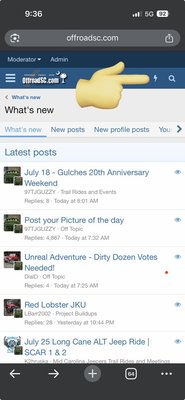
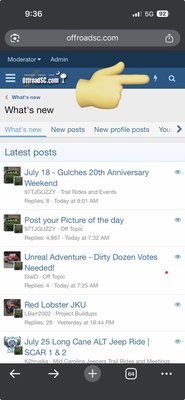
First Click the lightning Bolt for New Posts:
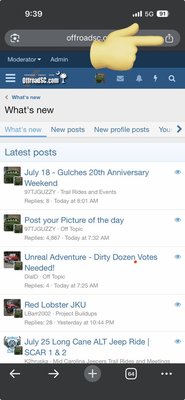
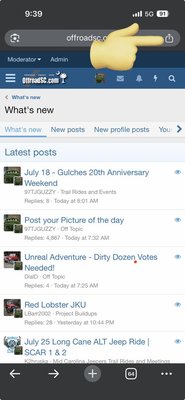
Then Click the share icon near the top right:
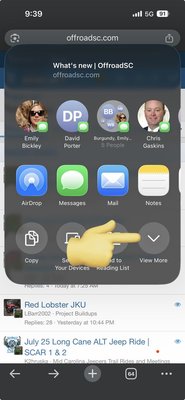
Click View More:
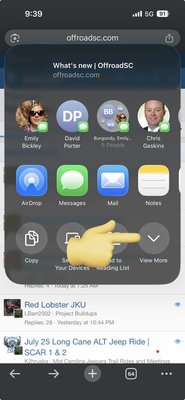
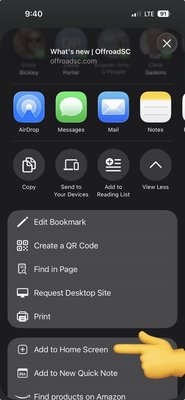
Scroll down and click "Add to Home Screen":
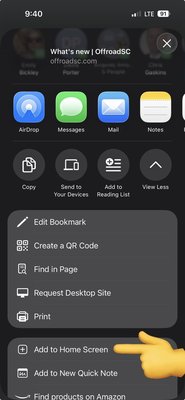
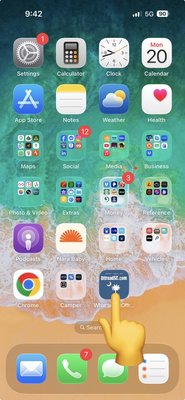
Then you can file it wherever you like on your home screen:
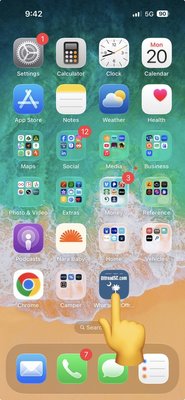
Now whenever you click the icon you will open the new posts page on the forum.
You can also do this on Android as well, Open the site in Chrome, press the 3 vertical dots in the upper right corner of the browser, press "Add to Home screen" and then edit the Home Screen Icon name to anything of your choosing. Done!
I promise if you try using this forum in a mobile browser, you will not be disappointed at all.
However, if you want a easy way to access this forum that functions very similarly to a native iOS or Android app, use the steps below to add an app like icon to your mobile device's home screen.
Here's how to do it on an iPhone:
Updating this for the newest version of Iphone IOS:
First Click the lightning Bolt for New Posts:
Then Click the share icon near the top right:
Click View More:
Scroll down and click "Add to Home Screen":
Then you can file it wherever you like on your home screen:
Now whenever you click the icon you will open the new posts page on the forum.
You can also do this on Android as well, Open the site in Chrome, press the 3 vertical dots in the upper right corner of the browser, press "Add to Home screen" and then edit the Home Screen Icon name to anything of your choosing. Done!
Last edited: